
Digital asset management for press and marketing teams
Whether it's a request from a journalist, a short-notice campaign or the next social media post — your team needs the right pictures, videos and documents ready to go, with clear usage rights, and without searching through five different folders. VAULO brings your brand and campaign media together in one place and makes it directly accessible to newsrooms through your own press portal.
- GDPR-compliant
- Data stored exclusively in Germany
- Penetration test passed
- Software made in Germany
- Alliance for Cyber Security
Looking for a solution built specifically for your industry? See the industry solutions




An asset's way through the company
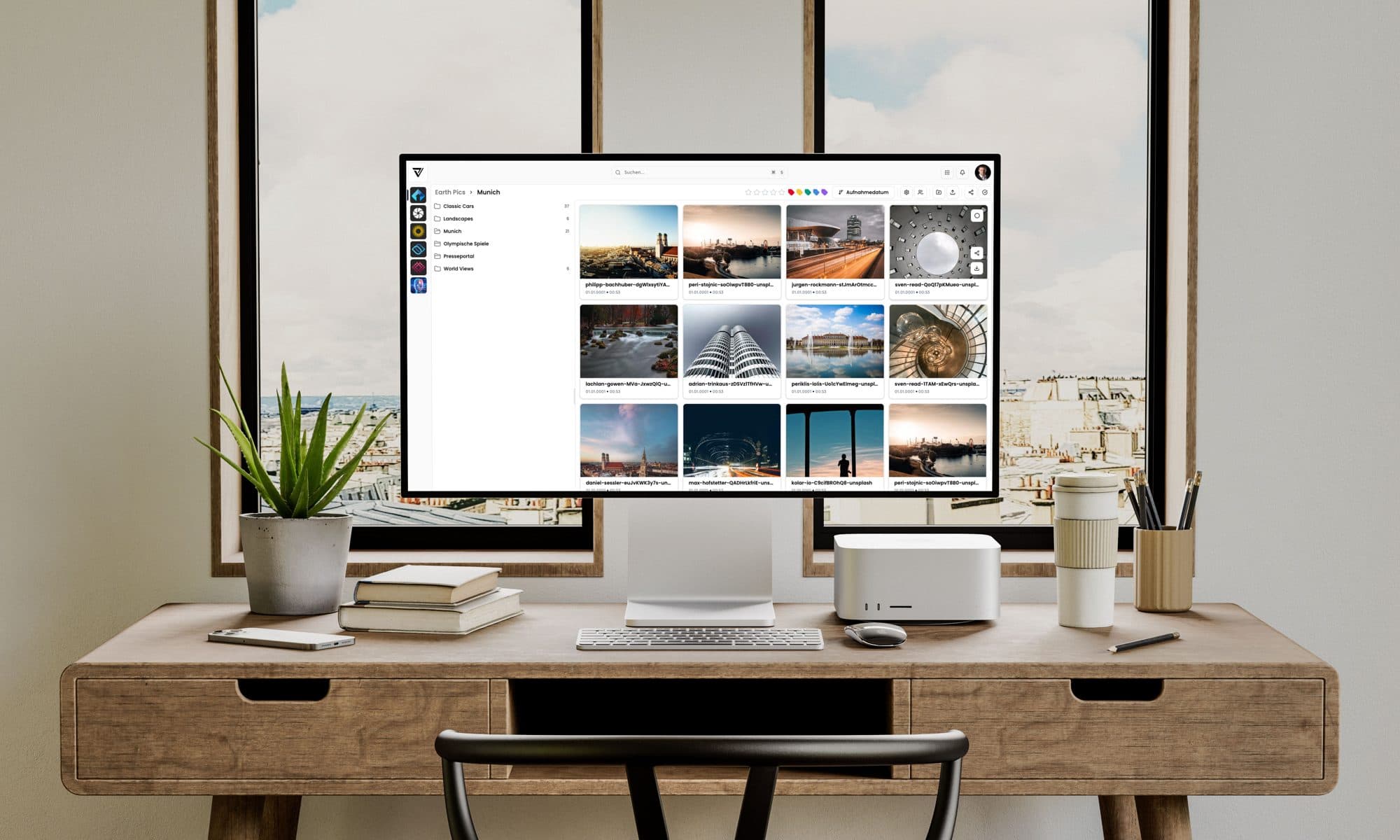
Whether one person handles press and marketing in personal union, or you run separate teams: both draw on the same pictures, videos and brand guidelines. A central media archive makes sure everyone works with current, approved material — without emailing files back and forth.
If you would rather keep the archives separate, that works just as well: with roles and permissions you set up your own spaces for press and marketing. Each team then works exclusively in its own area, with no visibility into what the other holds — you decide who looks in, not a shared folder that happens to be open to everyone.
There's a lot to do between the first photo and publication. VAULO turns that into a workflow. Here are the features that make it happen.
Intake
- LiveUpload
A shoot in New York, and the team in Munich sees the raw files the same second — editing can start while shooting is still going on on site. At a press event that means: journalists have the first pictures in hand before the press conference is even over.
- ExternalUpload
Normally photographers, videographers and agencies deliver through their own systems — which cloud storage that is is up to the provider, not you. ExternalUpload flips that around: the files land straight in your system, delivered exactly where you need them — nobody has to download from a third-party platform first just to upload everything to you again afterwards. That also guarantees your content is processed on German servers, GDPR-compliant throughout — instead of sitting somewhere outside your control beforehand.
- DayPassModul
At a larger event you often need several external crews on short notice — say two photographers, two videographers and an agency on top. You don't want to set up annual licences for them just because they're there for a single day. With DayPass you buy access by the day: you pay only for the day you actually need, instead of being locked into annual cycles by default.
Processing
- VisionAI FotoModul
Instead of captioning every picture by hand, VisionAI Foto delivers a headline, description and keywords in seconds — automatically on every upload, in your style, in every language you need, and in plain language on request. Logos and brand names are recognised too: if a sponsor appeared in your event photo, you'll find the picture later by searching for exactly that name. The automation can be limited to specific spaces, for instance only the press or social media folder. Processing happens exclusively in Germany, GDPR-compliant, and your pictures never feed into AI training.
- VisionAI VideoModul
Instead of spending hours reviewing raw footage, VisionAI Video delivers exactly the information you need — with fields you define and name yourself, instead of rigid presets. That turns a one-hour conference recording into an automatic summary, an interview into a full cut list with quotes, and a yes/no field can even flag submitted footage for possible deepfakes — useful when recordings come from external sources. Processed in Europe, GDPR-compliant, with no AI training on your content.
- VisionFaceModul
Whether it's a press conference with the board or an event with hundreds of guests: once you've stored a reference picture, VisionFace automatically recognises that person on every other photo across your whole archive. Processing runs entirely on VAULO's own servers, with no external AI provider involved. You manage reference pictures yourself, revocable at any time, visible only within your own organisation.
Review
- Comments
Feedback on a picture or video stays right on the asset — with arrows, circles or freehand marks you point straight at the picture, or the right spot in the video, instead of wrestling it into words. If editing runs through the Adobe integration, the editor even sees the comments at the exact right spot in the Premiere Pro timeline. Every comment shows who wrote it, and colleagues on the team reply directly instead of starting a new email thread.
- Absprachemodus
The same comment feature, just for review with people outside your organisation — VAULO calls this Absprachemodus ("coordination mode"): external agencies or partners leave their feedback directly in a shared presentation from the Presentation Studio, no VAULO account of their own required, just the shared link.
- Version history
When you upload a file with the same name again, you decide what happens: create it as a new, independent file, or add it as another version of the existing one. Every version is kept and can be reactivated at any time — building a complete timeline of what changed on a file, and when.
- Labels
Five label colours are available — the colours themselves are fixed, because they follow the same standard as Adobe products: set a label in VAULO and it shows up there immediately, and the other way round too. What you name the labels, though, is up to you — visible only inside VAULO, which is exactly what makes it useful for your own sorting. A red label might mean "Cleared for press" for you, showing at a glance which pictures are already allowed out.
- Star ratings
Star ratings follow a standardised format too, compatible with Adobe products. If a photographer already starred a picture in Lightroom or Bridge before uploading, you see that directly in VAULO — and the other way round: rate a shot in VAULO and the rating shows up there as well. That works for every media type, not just photos — handy for agreeing quickly, as a team, on the strongest shots from a shoot.
Rights & labeling
- Usage notes
A usage right that quietly expires is usually something you only notice once it's too late. VAULO makes it visible: once the stored usage period runs out, the copyright note in the grid view turns red automatically — one glance tells you where to check. VAULO also warns you by email ahead of time, and you decide how many days in advance. You store your own usage terms directly as text on the file.
- Restrictions
Sometimes a picture simply can't be used any more — a sponsor pulled out, a campaign got cancelled, a model release expired. With restrictions you block downloads immediately, or from a set point in the future, independent of the usage period. A key icon in the grid makes the lock visible at a glance, so the file doesn't accidentally end up somewhere it no longer belongs.
- Data StudioModul
Create custom fields for exactly what you actually need to track — from a required field for the AI labeling of generated campaign images mandated since August 2026 (EU AI Act, Article 50) to individual details for your press and marketing team. If photographers or agencies deliver via ExternalUpload, these fields can be made mandatory: without a completed credit line or usage note, the file doesn't even upload. With VisionAI switched on, custom fields can even be filled in automatically by AI instead of by hand.
- Roles and permissions
Instead of picking from ready-made roles, you create your own — down to the smallest detail. One person might only be allowed to keyword, but not download; another only to comment; a third to give final approval. You assign each role individually to the right people, instead of giving everyone access to everything by default. Combined with separate spaces for press and marketing, that lets you define exactly who can see, edit or approve what — right down to individual folders or files.
Publishing
- Feed Page
Your own press portal, set up in minutes: journalists access approved pictures and documents directly, without requesting individual files from your press office. You write press releases and articles directly in VAULO — no separate CMS, no extra tool you first have to connect. That saves not only the cost of more software, but also the detour of downloading content from VAULO just to upload it into another system again.
- NewsletterModul
The logical extension of Feed Page: articles that appear there, you send out directly as a newsletter, without writing them again somewhere else. Design and custom variables adapt fully to your corporate design — everything is written directly in VAULO. When you send, you pick recipients straight from your Contacts, including individual distribution groups.
- ContactsModul
You manage press and distribution contacts directly in the system, instead of in a separate spreadsheet. Every contact gets up to five freely definable attributes — besides the required email address, for example name, phone number or newsroom. Groups let you build your own distribution lists, say by desk or region, and pick exactly the recipients you want to reach when you send a newsletter.
- VisitorHubModul
One link, two levels: whoever opens it sees the public area right away — freely accessible to anyone with the link, no sign-in required. If a journalist logs in with their own access, a second, more exclusive area opens up for them. That lets you make exclusive content available to specific people — pictures, documents or information nobody else gets to see.
- AI search
Find any shot by its content, not just its file name — with fuzzy or precise search, whichever fits what you're looking for right now. You create your own search filters individually: just for yourself, or shared with the whole team. Compared to classic search on your own machine, that saves noticeable time — VAULO teams spend up to 35% less time searching.
- Presentation StudioModul
The real trick isn't just the corporate design, it's the building-block system behind it: you assemble every presentation yourself from individual blocks — which folders show, what layout the pictures appear in, how filtering works, which header image, with or without login via VisitorHub. With over 1,000 customisation options, that turns into a quick media kit for journalists, a media portal with individual access, or a permanent brand portal as a fixed brand presence, depending on the occasion — no two presentations look alike. Once you've designed one, save it as a template: the next presentation is then built with a keystroke, instead of starting from scratch again.
Security for campaign and press material before it goes public
Campaign images before launch, unpublished statements, embargo dates — your team constantly works with content that isn't meant for the public yet. Clearly defined access and storage in Germany make sure it stays that way, until you click "publish" yourself.
- Data centre in Germany
Data is stored exclusively in a Microsoft Azure data centre in Frankfurt, certified to ISO/IEC 27001, BSI C5:2020 and TISAX.
- Controlled access
Roles and permissions define who can see, edit, download or pass content on to press and partners.
- GDPR-compliant
VAULO processes personal data in line with the GDPR, backed legally by a data processing agreement.
- Regular penetration testing
The security architecture is continuously tested by independent penetration tests.


Questions press and marketing teams ask
What is a digital asset management system for press and marketing teams?
A DAM brings pictures, videos and documents together in one central place, makes them quickly findable through AI-assisted search, and governs who can see, edit or approve which content — from the first shot to publication.
How is VAULO different from cloud storage like Dropbox or Google Drive?
Unlike plain file storage, VAULO also handles keywording, rights management, approval workflows and direct publishing — for example via your own press portal or individual access for journalists. All data is processed on German servers, GDPR-compliant.
Can journalists access approved pictures directly, without their own VAULO account?
Yes. Feed Page creates a publicly accessible press portal, and VisitorHub can additionally set up a registered, individually approved area for specific journalists or partners.
Is VAULO GDPR-compliant, and where is the data stored?
Yes. VAULO stores data exclusively in a Microsoft Azure data centre in Frankfurt, certified to ISO/IEC 27001, BSI C5:2020 and TISAX, and processes personal data in line with the GDPR.
How does VAULO label AI-generated campaign images under the EU AI Act?
The Data Studio lets you create a custom required field for the AI labeling mandated since August 2026 (EU AI Act, Article 50), which must be filled in on upload.
Can press and marketing teams have separate access rights to the same media archive?
Yes. Granular roles and permissions let you set up separate spaces for press and marketing, so the two teams can work either together or fully separately.
What does a digital asset management system like VAULO cost?
Cost depends on storage needs, number of users and the add-ons you book, such as VisionAI or Presentation Studio. VAULO puts together an individual quote for that — the entry-level Corporate Essentials plan starts at €1,700 a year.
We'll show you how VAULO makes your daily work easier
In a personal walkthrough we look at your press and marketing day-to-day and show you exactly where VAULO fits in, and how it helps you make your everyday work noticeably easier.
Want to see how VAULO is used specifically in your industry? See the industry solutions